
21 KiB
Send Email
- Note
- API documentation
- Definitions
- Use Gmail API to send messages
- Use SMTP to send messages
- Google Workspace SMTP relay service
- Send an email
- Send an email from a user sendas
- Send an email from a group
- Send an email to notify a person of their new Google Workspace account
- Send an email from users
- Send an email to users
- Simple
replace <Tag> <String>processing - Example
- Conversation mode
Note
Thanks to @bousquf for the following enhancement. You want to send a message from an authorized group but a group email address can't be used in the Gmail API as the sender. Alternatively, you want to send a message from a user's alternate sendas address.
Added the option mailbox <EmailAddress> to gam sendemail to allow specifying the sender email address used in the Gmail API as different from from <EmailAddress>.
API documentation
Definitions
<RegularExpression> ::= <String>
        See: https://docs.python.org/3/library/re.html
<REMatchPattern> ::= <RegularExpression>
<RESearchPattern> ::= <RegularExpression>
<RESubstitution> ::= <String>>

<DomainName> ::= <String>(.<String>)+
<EmailAddress> ::=
        <String>@<DomainName> |
        <String> <<String>@<DomainName>> # The outer <> around <String>@<DomainName> are literal, e.g., IT Group<group@domain.com>
<EmailAddressList> ::= "<EmailAddress>(,<EmailAddress>)*"
<EmailAddressEntity> ::=
        <EmailAddressList> | <FileSelector> | <CSVkmdSelector>
        See: https://github.com/GAM-team/GAM/wiki/Collections-of-Users
<RecipientEntity> ::= <EmailAddressEntity> | (select <UserTypeEntity>)
<UserItem> ::= <EmailAddress>|<UniqueID>|<String>

<StorageBucketName> ::= <String>
<StorageObjectName> ::= <String>
<StorageBucketObjectName> ::=
        https://storage.cloud.google.com/<StorageBucketName>/<StorageObjectName>|
        https://storage.googleapis.com/<StorageBucketName>/<StorageObjectName>|
        gs://<StorageBucketName>/<StorageObjectName>|
        <StorageBucketName>/<StorageObjectName>

<UserGoogleDoc> ::=
        <EmailAddress> <DriveFileIDEntity>|<DriveFileNameEntity>|(<SharedDriveEntity> <SharedDriveFileNameEntity>)

<MessageContent> ::=
        (message|textmessage|htmlmessage <String>)|
        (file|textfile|htmlfile <FileName> [charset <Charset>])|
        (gdoc|ghtml <UserGoogleDoc>)|
        (gcsdoc|gcshtml <StorageBucketObjectName>)
<Time> ::=
        <Year>-<Month>-<Day>(<Space>|T)<Hour>:<Minute>:<Second>[.<MilliSeconds>](Z|(+|-(<Hour>:<Minute>))) |
        (+|-)<Number>(m|h|d|w|y) |
        never|
        now|today

<SMTPDateHeader> ::=
        date|
        delivery-date|
        expires|
        expiry-date|
        latest-delivery-time|
        reply-by|
        resent-date
<SMTPHeader> ::=
        accept-language|
        alternate-recipient|
        autoforwarded|
        autosubmitted|
        bcc|
        cc|
        comments|
        content-alternative|
        content-base|
        content-description|
        content-disposition|
        content-duration|
        content-id|
        content-identifier|
        content-language|
        content-location|
        content-md5|
        content-return|
        content-transfer-encoding|
        content-type|
        content-features|
        conversion|
        conversion-with-loss|
        dl-expansion-history|
        deferred-delivery|
        delivered-to|
        discarded-x400-ipms-extensions|
        discarded-x400-mts-extensions|
        disclose-recipients|
        disposition-notification-options|
        disposition-notification-to|
        encoding|
        encrypted|
        from|
        generate-delivery-report|
        importance|
        in-reply-to|
        incomplete-copy|
        keywords|
        language|
        list-archive|
        list-help|
        list-id|
        list-owner|
        list-post|
        list-subscribe|
        list-unsubscribe|
        mime-version|
        message-context|
        message-id|
        message-type|
        obsoletes|
        original-encoded-information-types|
        original-message-id|
        originator-return-address|
        pics-label|
        prevent-nondelivery-report|
        priority|
        received|
        references|
        reply-to|
        resent-bcc|
        resent-cc|
        resent-from|
        resent-message-id|
        resent-reply-to|
        resent-sender|
        resent-to|
        return-path|
        sender|
        sensitivity|
        subject|
        supersedes|
        to|
        x400-content-identifier|
        x400-content-return|
        x400-content-type|
        x400-mts-identifier|
        x400-originator|
        x400-received|
        x400-recipients|
        x400-trace
<SMTPHeaderList> ::= "<SMTPDateHeader|SMTPHeader>(,<SMTPDateHeader|SMTPHeader>)*"
Use Gmail API to send messages
By default, GAM uses the Gmail API to send email messages. Typically, Service Account access is used
but Client access will be used when gam.cfg todrive_clientaccess = True.
Use SMTP to send messages
Alternatively, GAM can use SMTP to send email messages. Messages are always sent on port 587 using starttls.
There are four gam.cfg variables used to configure SMTP.
smtp-fqdn- Fully qualified domain name used in SMTP EHLO command; default is to use system FQDNsmtp-host- The host name or IP address of the SMTP serversmtp-username- The username used for SMTP authentication; default is to not use authenticationsmtp-password- The password used for SMTP authentication; default is to not use authentication
GAM uses SMTP to send email messages when smtp-host is defined. SMTP authentication is performed
when both smtp_username and smtp_password are defined; otherwise, the connection is made without authentication.
The smtp_password can be specified as a plain text string or a Base64 encoded string.
plain text gam.cfg-smtp_password = passwordplain text command line-gam config smtp_password password saveBase64 gam.cfg-smtp_password = b'base64string'Base64 command line-gam config smtp_password = "b'base64string'"save
To convert a plain text string to Base 64 encoded string perform the following command:
- Windows -
powershell "[convert]::ToBase64String([Text.Encoding]::UTF8.GetBytes(\"password\"))" - Linux/MacOS -
echo -n "password" | base64
Google Workspace SMTP relay service
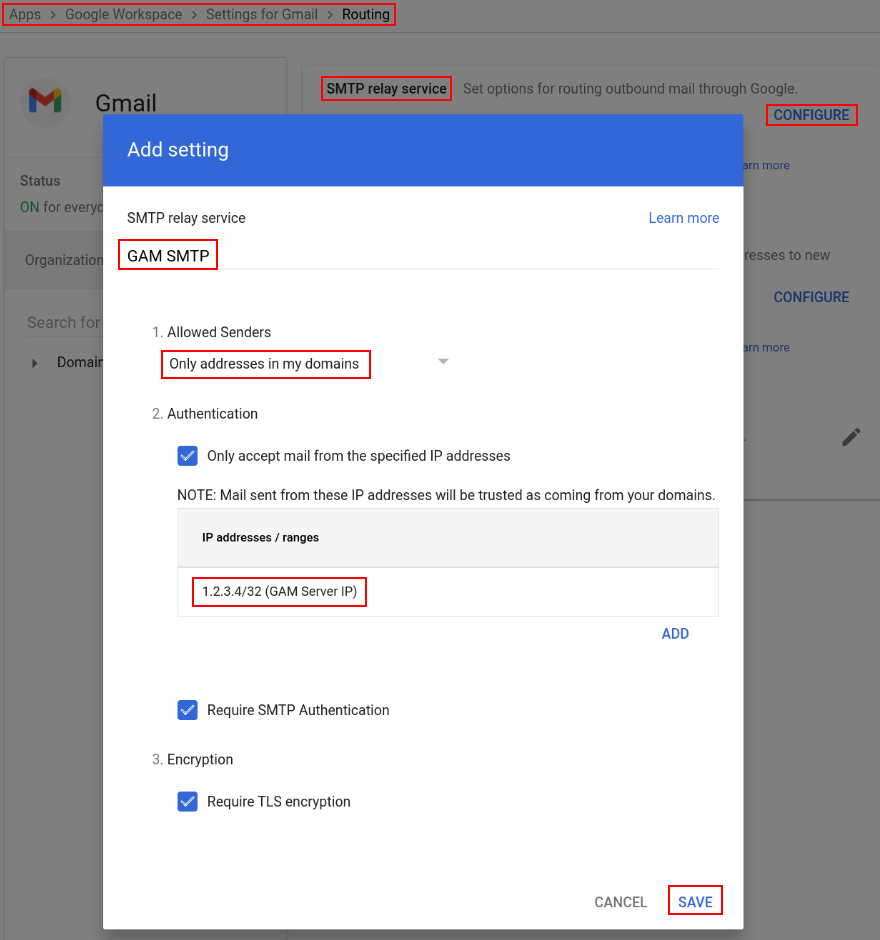
You can have GAM use SMTP in conjunction with the Google Workspace SMTP relay service. Configure it at Admin Console > Apps > Google Workspace > Gmail > Routing > SMTP relay service > CONFIGURE
-
Give the service a name, e.g., "GAM SMTP"
-
1. Allowed senders-Only addresses in my domain(s) -
2. Authentication- Check
Only accept mail from the specified IP addresses - Click
Add Description- Describe the IP address, e.g., "GAM Server IP"IP address/range- Enter the public IP address of your GAM server, e.g., 1.2.3.4/32- Check
Enabled - Click
SAVE - Check/uncheck
Require SMTP Authenticationas desired. If checked,smtp-passwordmust be a Gmail Application Specific password
- Check
-
3. Encryption- Check
Require TLS encryption
- Check
-
Click
SAVEin the lower right
Send an email
gam sendemail [recipient|to] <RecipientEntity>
        [from <EmailAddress>] [mailbox <EmailAddress>] [replyto <EmailAddress>]
        [cc <RecipientEntity>] [bcc <RecipientEntity>] [singlemessage]
        [subject <String>] [<MessageContent>]
        (replace <Tag> <String>)*
        (replaceregex <REMatchPattern> <RESubstitution> <Tag> <String>)*
        [html [<Boolean>]] (attach <FileName> [charset <Charset>])*
        (embedimage <FileName> <String>)*
        [newuser <EmailAddress> firstname|givenname <String> lastname|familyname <string> password <Password>]
        (<SMTPDateHeader> <Time>)* (<SMTPHeader> <String>)* (header <String> <String>)*
        [threadid <String>]
By default, emails will be sent from the admin user named in oauth2.txt, override this with the from <EmailAddress> option.
When using the Gmail API/SMTP, GAM gets no/little indication as to the status of the message delivery; the from user will get a non-delivery receipt if the message could not be sent to the specified recipients.
By default, messages are sent as plain text, use html or html true to indicate that the message is HTML.
By default, a separate email is sent to each recipient; this isolates the recipient email addresses. If any of these options are specified, a single email will be sent to all of the recipients:
cc <RecipientEntity>bcc <RecipientEntity>singlemessage
The <SMTPDateHeader> <Time> argument requires <Time> values which will be converted to RFC2822 dates. If you have these headers with values that
are not in <Time> format, use the argument header <SMTPDateHeader> <String>.
If you have an SMTP header that is not found in <SMTPDateHeader> or <SMTPHeader>, use header <String> <String>.
You can embed images in HTML email messages.
Your HTML message will contain lines like this:
<img src="cid:image1"/>
<img src="cid:image2"/>
Your command line will have: embedimage file1.jpg image1 embedimage file2.jpg image2
Send an email from a user sendas
You want to send an email from a user's sendas address.
Use the mailbox <EmailAddress> to specify the user's primary email address and from <EmailAddress> to specify the sendas address.
gam sendemail destination@email.com from useralias@domain.com mailbox user@domain.com subject "test subject" message "text body" ...
Send an email from a group
You want to send an email from a group for which you are an authorized sender.
Use the mailbox <EmailAddress> to specify the sender email address used in the Gmail API as different from from <EmailAddress>.
gam sendemail destination@email.com from "IT Group<group@domain.com>" mailbox user@domain.com subject "test subject" message "text body" ...
Send an email to notify a person of their new Google Workspace account
You can send a message with account details to an email address when creating|updating a user; this might be the user's secondary email address. You can specify additional recipients, e.g., help desk personnel.
gam sendemail [recipient|to] <RecipientEntity> [from <EmailAddress>]
        [replyto <EmailAddress>]
        [cc <RecipientEntity>] [bcc <RecipientEntity>] [singlemessage]
        [subject <String>] [<MessageContent>]
        (replace <Tag> <String>)*
        (replaceregex <REMatchPattern> <RESubstitution> <Tag> <String>)*
        [html [<Boolean>]] (attach <FileName> [charset <Charset>])*
        (embedimage <FileName> <String>)*
        [newuser <EmailAddress> firstname|givenname <String> lastname|familyname <string> password <Password>]
        (<SMTPDateHeader> <Time>)* (<SMTPHeader> <String>)* (header <String> <String>)*
        [threadid <String>]
By default, emails will be sent from the admin user named in oauth2.txt, override this with the from <EmailAddress> option.
When using the Gmail API, GAM gets no/little indication as to the status of the message delivery; the from user will get a non-delivery receipt if the message could not be sent to the specified recipients.
By default, messages are sent as plain text, use html or html true to indicate that the message is HTML.
The recipient|to, firstname|givenname, lastname|familyname and password options are required when newuser <EmailAddress> is specified.
In the subject and message, these strings will be replaced with the specified values:
#givenname#- first/given name#familyname#- last/family name#email#- user's email address#user#- user's email address#username#- portion of user's email address before @#domain#- portion of user's email after after @#password#- password
If subject is not specified, the following value will be used:
Welcome to #domain#
If message is not specified, the following value will be used:
Hello #givenname# #familyname#,\n\nYou have a new account at #domain#\nAccount details:\n\nUsername\n#user#\n\nPassword\n#password#\n\n Start using your new account by signing in at\nhttps://www.google.com/accounts/AccountChooser?Email=#user#&continue=https://apps.google.com/user/hub\n
If you want a language/organization specific message, use a template file: message file <FileName> [charset <Charset>]
The <SMTPDateHeader> <Time> argument requires <Time> values which will be converted to RFC2822 dates. If you have these headers with values that
are not in <Time> format, use the argument header <SMTPDateHeader> <String>.
If you have an SMTP header that is not found in <SMTPDateHeader> or <SMTPHeader>, use header <String> <String>.
You can embed images in HTML email messages.
Your HTML message will contain lines like this:
<img src="cid:image1"/>
<img src="cid:image2"/>
Your command line will have: embedimage file1.jpg image1 embedimage file2.jpg image2
Examples
Send an email to a user's personal address notifying them of their new Google Workspace account;
use the newuser option and default subject and message.
gam sendemail bob@gmail.com newuser bob@domain.com firstname Bob lastname Smith password xxxxxx
Send an email to a user's personal address notifying them of their new Google Workspace account; use custom subject and message.
gam sendemail bob@gmail.com subject "Your new #domain# account` message 'Bob, your new domain email address is bob@domain.com with password xxxxxx'
You can use a CSV file to do multiple new users.
Users.csv
personal,primaryemail,firstname,password
bob@gmail.com,bob@domain.com,Bob,xxxxxx
mary@gmail.com,mary@domain.com,Mary,xxxxxx
...

gam csv Users.csv gam sendemail "~personal" subject "Your new #domain# account` message '~~firstname~~, your new domain email address is ~~primaryemail~~ with password ~~password~~'
Send an email from users
gam <UserTypeEntity> sendemail recipient|to <RecipientEntity>
        [replyto <EmailAddress>]
        [cc <RecipientEntity>] [bcc <RecipientEntity>] [singlemessage]
        [subject <String>] [<MessageContent>]
        (replace <Tag> <String>)*
        (replaceregex <REMatchPattern> <RESubstitution> <Tag> <String>)*
        [html [<Boolean>]] (attach <FileName> [charset <Charset>])*
        (embedimage <FileName> <String>)*
        [newuser <EmailAddress> firstname|givenname <String> lastname|familyname <string> password <Password>]
        (<SMTPDateHeader> <Time>)* (<SMTPHeader> <String>)* (header <String> <String>)*
        [threadid <String>]
Emails will be sent from the users in <UserTypeEntity> to the recipients in <RecipientEntity>.
When using the Gmail API/SMTP, GAM gets no/little indication as to the status of the message delivery; the from user will get a non-delivery receipt if the message could not be sent to the specified recipients.
By default, messages are sent as plain text, use htmlmessage, htmlfile or html true to indicate that the message is HTML.
By default, a separate email is sent to each recipient; this isolates the recipient email addresses. If any of these options are specified, a single email will be sent to all of the recipients:
cc <RecipientEntity>bcc <RecipientEntity>singlemessage
The <SMTPDateHeader> <Time> argument requires <Time> values which will be converted to RFC2822 dates. If you have these headers with values that
are not in <Time> format, use the argument header <SMTPDateHeader> <String>.
If you have an SMTP header that is not found in <SMTPDateHeader> or <SMTPHeader>, use header <String> <String>.
You can embed images in HTML email messages.
Your HTML message will contain lines like this:
<img src="cid:image1"/>
<img src="cid:image2"/>
Your command line will have: embedimage file1.jpg image1 embedimage file2.jpg image2
Send an email to users
gam <UserTypeEntity> sendemail from <EmailAddress>
        [replyto <EmailAddress>]
        [cc <RecipientEntity>] [bcc <RecipientEntity>] [singlemessage]
        [subject <String>] [<MessageContent>]
        (replace <Tag> <String>)*
        (replaceregex <REMatchPattern> <RESubstitution> <Tag> <String>)*
        [html [<Boolean>]] (attach <FileName> [charset <Charset>])*
        (embedimage <FileName> <String>)*
        [newuser <EmailAddress> firstname|givenname <String> lastname|familyname <string> password <Password>]
        (<SMTPDateHeader> <Time>)* (<SMTPHeader> <String>)* (header <String> <String>)*
        [threadid <String>]
Emails will be sent to the users in <UserTypeEntity>.
When using the Gmail API/SMTP, GAM gets no/little indication as to the status of the message delivery; the from user will get a non-delivery receipt if the message could not be sent to the specified recipients.
By default, messages are sent as plain text, use htmlmessage, htmlfile or html true to indicate that the message is HTML.
By default, a separate email is sent to each recipient; this isolates the recipient email addresses. If any of these options are specified, a single email will be sent to all of the recipients:
cc <RecipientEntity>bcc <RecipientEntity>singlemessage
The <SMTPDateHeader> <Time> argument requires <Time> values which will be converted to RFC2822 dates. If you have these headers with values that
are not in <Time> format, use the argument header <SMTPDateHeader> <String>.
If you have an SMTP header that is not found in <SMTPDateHeader> or <SMTPHeader>, use header <String> <String>.
You can embed images in HTML email messages.
Your HTML message will contain lines like this:
<img src="cid:image1"/>
<img src="cid:image2"/>
Your command line will have: embedimage file1.jpg image1 embedimage file2.jpg image2
Example
Send a message to a user, save the Message-ID so that a later reminder message can be sent referring to the first message.
$ gam user user1@domain.com sendemail to user2domain.com subject Test textmessage "Message"
User: user1@domain.com, Send Email to 1 Recipient
  Recipient: user2@domain.com, Message: Test, Email Sent: 17677ccdfdeae7ad

$ gam redirect csv UserEmail.csv user user1@domain.com print messages ids 17677ccdfdeae7ad headers To,Subject,Message-ID
$ more UserEmail.csv
User,threadId,id,Subject,To,Message-ID
user1@comain.com,17677d3e79d5f68a,17677d3e79d5f68a,Test,user2@domain.com,<CAPMj=+p3vdDz1Mjfpe1BpNPT7g-MN1SKifjjCFDme2ftppsMJA@mail.gmail.com>
Send reminder message.
$ gam csv UserEmail.csv gam user "~User" sendemail to "~To" subject "~Subject" textmessage "Reminder Message" references "~Message-ID" in-reply-to "~Message-ID"
User: user1@domain.com, Send Email to 1 Recipient
  Recipient: user2@domain.com, Message: Test, Email Sent: 17677cdfbe1146f4
Conversation mode
To reply to an email and have Gmail recognize it in conversation mode for the original sender, you have to specify the
References and In-Reply-to headers with the RFC822 Message ID from the original message
and the subject from the original message.
gam user recipient@domain.com sendemail to sender@domain.com references "<CAAMabc...XYZQ@mail.gmail.com>" in-reply-to "<CAAMabc...XYZQ@mail.gmail.com>" subject "Re: Original subject" textmessage "Reply text"
If you want to have Gmail recognize the reply in conversation mode in the Sent folder of the original recipient,
you must include threadid <String>; you can get the 'threadId` with:
gam user recipient@domain.com show threads query "rfc822MsgId:<CAAMabc...XYZQ@mail.gmail.com>"
Getting all Messages that match query ((rfc822MsgId:<CAAMabc...XYZQ@mail.gmail.com>)) for recipient@domain.com
Got 1 Message that matched query ((rfc822MsgId:<CAAMabc...XYZQ@mail.gmail.com>)) for recipient@domain.com...
User: recipient@domain.com, Show 1 Thread
  Thread: 19cfd414fe48430d
    Message: 19cfd414fe48430d
...

gam user recipient@domain.com sendemail to sender@domain.com references "<CAAMabc...XYZQ@mail.gmail.com>" in-reply-to "<CAAMabc...XYZQ@mail.gmail.com>" subject "Re: Original subject" textmessage "Reply text" threadid 19cfd414fe48430d
As of version 7.36.03, GAM has a command to simplify this process.
gam <UserTypeEntity> sendreply
        (((query <QueryGmail> [querytime<String> <Date>]*) [or|and])+) | (ids <MessageIDEntity>)
        [replyto <EmailAddress>]
        [subject <String>] [<MessageContent>] [html [<Boolean>]]
        (attach <FileName> [charset <CharSet>])*
        (embedimage <FileName> <String>)*
        (<SMTPDateHeader> <Time>)* (<SMTPHeader> <String>)* (header <String> <String>)*

gam user recipient@domain.com sendreply query "rfc822MsgId:<CAAMabc...XYZQ@mail.gmail.com>" textmessage "Reply text"